


ViruSweep - Antivirus & Clean
3.8221.00 Reviews
App Specs
- Version
- 1.6.1.0
- Updated On
- License
- Free
- Downloads
- 1,000,000+
- Developer
- Kadara Systems
- Categories
- Tools
- Platform
- Android
Screenshots

 Analysis by AppCompare
With a utility app that promises several kinds of phone maintenance, I find the first real test is not the number of buttons on the home screen but whether I can tell what each action will do. ViruSweep - Antivirus & Clean brings security checks and file cleanup together, which can be convenient, but it also makes a little care worthwhile: a scan, a privacy check, and a cleanup are different jobs, and I would not treat them as one automatic fix for every phone problem.
Where users can get stuck
The main point of friction with an all-in-one tool is knowing what to tap first. If your immediate concern is a suspicious download, start with the security side rather than clearing files. If storage is the problem, review the cleanup results before removing anything. That simple separation makes the app easier to use responsibly and helps avoid the common mistake of expecting a cleaner to solve a security issue, or a scanner to make a nearly full phone feel spacious.
I would also avoid repeating scans simply because the first screen looks busy or because a phone feels slow. A scan is useful when you have a reason to check, such as after downloading a file you do not trust. For ordinary maintenance, it makes more sense to look at what the app reports, decide whether action is needed, and then leave the phone alone if nothing calls for attention. Useful maintenance starts with a clear reason to act, not with tapping every tool in sequence.
Setup checks before relying on it
ViruSweep is a free tools app from Kadara Systems, and its straightforward presentation should suit people who would rather not learn a complicated security dashboard. Before relying on any phone utility, I recommend checking that the installed app is current and that your device meets its basic system requirements. The current release is version 1.6.1.0, and it requires Android 9 or later. Those details matter most if the app will not install, opens unexpectedly, or behaves differently after a phone update.
It is also worth taking a moment to understand the prompts the app shows during setup. Security and file tools may need access to parts of the device to carry out the task you choose. Read each request in context instead of approving everything automatically; if a prompt is unclear, pause and check the relevant Android settings before continuing. That is a better habit than granting access just to get past a screen, especially on a phone used for banking, work, or private messages.
Recovering a workflow when something feels off
If a scan appears to stall or a cleanup does not seem to change available space, I would first close the app and reopen it, then check whether the phone itself is responsive and has a stable connection if the task needs one. Next, make sure the app is up to date and restart the device if other apps are also acting strangely. These are ordinary troubleshooting steps, not a guarantee that every issue is caused by ViruSweep.
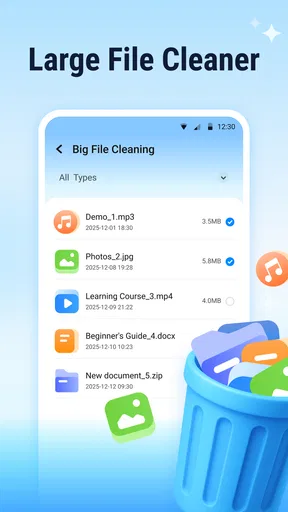
When a cleaner identifies files for removal, take a second look at the selection before confirming. Temporary clutter and personal downloads are not interchangeable, and deleting a file you still need is a poor trade for a tidier storage screen. If you cannot tell what a suggested item is, leave it in place and use the phone’s own file manager to inspect it. I prefer a cautious cleanup that frees less space to a rushed one that removes something important.
Worth Reading Before You Choose

EA SPORTS FC Mobile 26 Is a Bigger Football Game, but It Takes Time

Flipboard Shows What News Apps Must Do Beyond the Feed

Switching to Android Auto Means Rethinking Your Driving Routine

Google Calendar Makes a Crowded Week Easier to Manage

Ludo King Makes the Most of the Minutes Between Plans

Baby Panda World Brings Quick Play to Modern Phones, but Its Game Library Feels Busy
When the app may not be the cause
A phone that feels sluggish can be responding to several things at once: a large download, a demanding app, limited free storage, or a system task running in the background. Cleaning files may help with space, but it is not a universal speed switch. I would compare how the phone behaves before and after one specific action, rather than crediting or blaming the cleaner for every change. If the device continues to freeze or overheat, check its system settings and the apps using the most resources as well.
Likewise, an antivirus result needs careful interpretation. A warning is a reason to inspect what was flagged and where it came from; it is not a reason to panic or delete an unfamiliar item without context. Keep Android updated, use trusted sources for downloads, and be wary of messages asking you to install files or share personal information. A security app can support those habits, but it cannot replace them.
A Breath of Fresh Air for Your Device
First off, installing ViruSweep - Antivirus & Clean was a breeze. No unnecessary hoops to jump through, which is always a good start. Once you fire it up, you're greeted with a clean and intuitive interface. It's got that minimalist vibe that I personally dig—nothing too flashy, just straight to the point. The app is designed to be user-friendly, making it perfect for those who aren’t exactly tech wizards.
Features That Pack a Punch
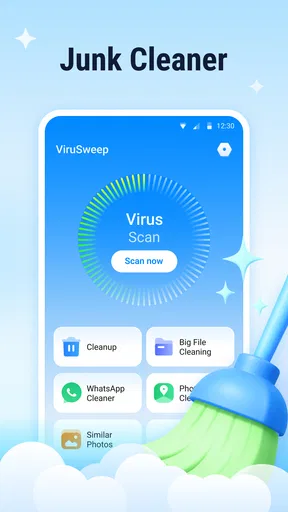
Now, let’s talk features because that’s where the magic happens. ViruSweep offers a comprehensive suite of tools to keep your device in tip-top shape. The antivirus scanner is the star of the show here. It runs swiftly and digs deep into your phone's nooks and crannies, ensuring all those pesky bugs and malware are kept at bay. I ran a few tests, and it was reassuring to see it catch a couple of shady files I didn’t even know were lurking around.
Besides its robust scanning capabilities, you’ve got a nifty phone booster and cleaner. This feature is like a breath of fresh air for your device, especially if you’re like me and tend to accumulate a ton of junk files. With just a tap, it clears out the clutter, freeing up space and boosting performance. Who doesn’t love a little extra storage and speed?
Privacy at the Forefront
In today’s world, privacy is crucial, and ViruSweep doesn’t skimp on that. The app includes a privacy advisor that keeps you in the loop about which apps have access to your sensitive data. It’s like having a watchdog that’s always on duty, ensuring your personal info stays just that—personal.
- Real-time protection keeps you safe as you browse, download, and chat.
- The app lock feature adds an extra layer of security, allowing you to lock specific apps with a PIN or pattern.
Performance and Usability
Performance-wise, ViruSweep runs smoothly without eating up your battery or hogging resources, a common problem with some antivirus apps. It works quietly in the background, so you can carry on with your day-to-day activities without any hiccups. I appreciate that it doesn't bombard you with notifications—a little peace and quiet goes a long way.
Navigating through the app is a piece of cake, thanks to its straightforward layout. Whether you’re a tech novice or a seasoned pro, you’ll find everything you need without a hitch.
Using it as part of a sensible routine
A realistic use case is a phone that has become cramped after a week of saving travel tickets, screenshots, and downloaded documents. I would use the file manager first to identify anything I recognize and still need, then use ViruSweep’s cleaner to review what it proposes to remove. Afterward, I would check whether the space issue has actually improved instead of assuming that a cleanup also fixed every slowdown. This small before-and-after check makes it easier to judge whether the tool helped.
The scanner is more relevant after an unexpected download or when you want a second look at a file that seems questionable. For everyday browsing, though, I would not use repeated scans as a substitute for sensible downloading habits. And if you mainly want to protect a single private app from someone who occasionally borrows your phone, the app-lock option may be more useful to you than running a full cleanup. The practical value is in choosing the relevant tool, rather than treating every feature as mandatory.
How it compares with other phone tools
ViruSweep’s appeal is having several maintenance and privacy functions together, rather than switching among a standalone antivirus tool, a separate storage utility, and Android’s own settings. That can make routine checks feel less fragmented, particularly for someone who prefers one simple place to start. The trade-off is that an all-in-one app is not automatically the best choice for every task. Android’s built-in storage controls may be enough if you only need to review space, while a dedicated security product may suit someone who wants a more specialized approach.
I would choose ViruSweep if I wanted a single, approachable toolbox and was willing to review its suggestions instead of accepting them blindly. I would skip it if I only needed occasional file management and preferred to keep the number of installed utilities low, or if I wanted to investigate a persistent device problem in depth. A cleaner cannot diagnose every cause of lag, and a privacy advisor is not a replacement for checking an app’s own settings and permissions.
Who is likely to get the most from it?
The app makes the most sense for people who are not comfortable digging through several Android menus and want a guided way to check security, storage, and app privacy. Its Everyone content rating and simple layout make it approachable for a broad audience, while its tools can be useful for someone who regularly downloads files or shares a device with family. ViruSweep is free, and it has reached over a million installs; its average rating is three and a half stars from around two thousand nine hundred ratings, with 133 written reviews. Those figures suggest it has found an audience, but they do not tell me whether its choices will suit your phone or habits.
It is less compelling for someone who already keeps storage organized, relies on Android’s built-in protections and controls, and has no need for an extra app lock or privacy overview. If your phone has a serious security concern, I would not rely on a single scan as the whole response. Review the file source, remove anything you knowingly installed from an untrusted place, update the operating system, and seek trustworthy technical help if the problem persists.
Wrapping It Up
In conclusion, ViruSweep - Antivirus & Clean is a solid choice if you’re looking to keep your device secure and running smoothly. It combines essential features with a user-friendly interface, ensuring that even the least tech-savvy among us can enjoy top-notch protection. While no app is perfect, this one certainly ticks a lot of boxes for me.
If you’re on the hunt for an antivirus app that doesn’t overpromise and underdeliver, you might want to give ViruSweep a shot. It’s like having a personal security guard for your phone, minus the hefty paycheck. So go ahead, give your device the TLC it deserves!
My practical verdict
My recommendation is to treat this as a convenient starting point for maintenance, not as a replacement for careful file handling or Android’s own controls. The strongest reason to try it is the combination of scanning, cleanup, and privacy tools in an interface that does not ask a beginner to piece together several separate utilities. The main reason to hesitate is that every cleanup suggestion deserves a quick review, and a phone problem that continues after basic checks may need attention elsewhere.
If you install it, begin with the one task you actually need: inspect a suspicious download, review storage, or check which apps can access sensitive information. Keep anything you do not recognize but cannot safely identify, and avoid interpreting a clean scan as proof that every security risk is gone. Used with that modest, deliberate approach, ViruSweep can be a handy free addition for the right Android user; if your needs are narrow or you prefer built-in tools, you may not gain enough to justify another app.
Pros
- User-friendly interface with easy navigation.
- Real-time virus scanning for instant protection.
- Efficient cleaning boosts device performance.
- Low battery consumption during scans.
- Frequent updates with latest virus definitions.
Cons
- Contains ads that might be intrusive.
- Limited features in the free version.
- Occasional false positives in scans.
- Requires internet for full functionality.
- Lacks advanced customization options.
FAQs for ViruSweep - Antivirus & Clean
What features does ViruSweep offer to enhance device security?
ViruSweep provides a comprehensive suite of features to protect your device from malware, including real-time virus scanning, automatic updates for the latest threats, and a secure browsing feature to block malicious websites. Additionally, it offers device optimization tools, such as junk file cleaning and memory boosting, to ensure your device runs smoothly.
Is ViruSweep free to use, or does it require a subscription?
ViruSweep offers a free version with basic security features, which is great for casual users. However, for more advanced protection and optimization tools, users can opt for a premium subscription. The premium version includes enhanced features like automatic scans, priority customer support, and advanced threat detection capabilities.
How does ViruSweep impact the performance of my device?
ViruSweep is designed to be lightweight and efficient, ensuring minimal impact on device performance. It runs seamlessly in the background and includes optimization tools like cache cleaning and memory management to enhance device speed. Users report improved device responsiveness and battery life after installation.
Can ViruSweep protect my data while browsing the internet?
Yes, ViruSweep includes a secure browsing feature that protects your data while online. It blocks access to potentially harmful websites and alerts you to phishing attempts and malicious links. This ensures your personal information remains safe while you surf the web on your Android or iOS device.
How user-friendly is the interface of ViruSweep for non-tech-savvy users?
ViruSweep boasts an intuitive and user-friendly interface, making it accessible even for non-tech-savvy users. The app features a simple dashboard with clear icons and straightforward navigation. Users can easily perform scans, update definitions, and access tools without needing technical expertise, making it a perfect choice for all user levels.


